
Latency — learning what to do about it
Step by step, in by inch
I assumed I understood audio latency on computers. Buffer size? Check. Sample rate? Check. CPU load? Keep it low, freeze tracks, print effects. I absorbed Kenny Gioia’s Adjusting Recording Latency (Loopback Test) in REAPER video, made the adjustments, and upgraded to an interface (Rubix44) with better monitoring abilities.
And yet… every so often — on machines that should have been fine — I’d get the dreaded symptoms: a DAW freeze, a sudden glitch, or that heart-stopping moment where audio just… stops responding.
The CPU meter wasn’t pegged. Disk activity looked normal. Nothing obvious was wrong. I chalked it up to “Windows being Windows” and moved on. And that worked… until it didn’t!
The Hidden Kind of Latency
What I’ve learned is that not all latency lives inside your DAW. There’s another layer — deeper, quieter, and far more insidious — called interrupt latency. This is about how quickly your system can respond to real-time events: audio buffers, MIDI messages, USB traffic, network activity.
When that layer misbehaves, your DAW can freeze even when everything looks fine.
Enter LatencyMon!
Download LatencyMon from Resplendence Software
What is it?
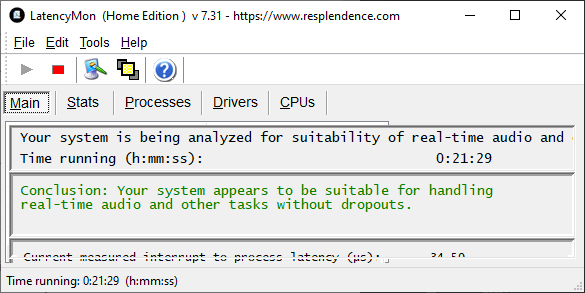
LatencyMon is a free diagnostic tool that doesn’t measure audio performance directly. Instead, it watches how your system handles interrupts and deferred procedure calls (ISRs and DPCs). If those spike too high, real-time audio suffers.
At first glance, LatencyMon can feel… unfriendly. Acronyms, scary red text, references to drivers you’ve never heard of. But with a little context, it becomes an incredibly empowering tool.
The Big Mental Shift: Chronic vs. Event-Driven Problems
Here’s the most important thing I learned: A system that runs clean for hours is not “bad.” A system that occasionally spikes has a trigger. This distinction changed everything.
If LatencyMon reports consistently high numbers, you may have a chronic configuration issue. But if it runs happily in the green for long stretches and then suddenly explodes? That’s almost always event-driven. Events that contribute to latency include:
- Sleep/wake.
- Display changes.
- Network activity.
- USB power management.
- Audio devices you’re not even using.
Once I understood this, LatencyMon stopped feeling accusatory and started feeling like a detective’s notebook. And my system stopped freezing. Mixes I worked on ‘last night’ started running just the same the morning after.
The Usual Suspects (and Some Surprises)
In my case, the biggest offenders were not my audio interface or my DAW. They were things like:
- Display audio drivers (HDMI / DisplayPort pretending to be speakers)
- Unused onboard audio
- Virtual audio devices I wasn’t actively using
- USB power management quietly re-enabling itself
- Network and ACPI activity during power state transitions
Disabling Intel Display Audio and unused Realtek audio alone dropped my worst interrupt spikes from tens of milliseconds to well under 50 microseconds. That’s not a tweak. That’s a revelation!
A Word About “Good” Numbers
After selectively disabling devices I didn’t need during recording, my system settled around 30–40 µs peaks. At that point, I stopped chasing numbers and started making music again.
LatencyMon doesn’t give you a single pass/fail score, but rough guidelines help:
- Under 100 µs ISR/DPC peaks: excellent
- Under 500 µs: solid
- Over 1000 µs: worth investigating
- Tens of thousands of µs: something is seriously misbehaving
After selectively disabling devices I didn’t need during recording, my system settled around 30–40 µs peaks. At that point, I stopped chasing numbers and started making music again. Which, frankly, is the goal.
Less Is More (Especially on Windows)
Every enabled audio device is something Windows feels responsible for managing, even if you’re not using it. You probably have some of these in plain sight:
- Webcam microphones.
- USB mics.
- Virtual routing drivers.
- Calibration “virtual devices.”
None of these are bad. But they don’t need to be present during a recording session. I now think of my system in modes:
- Recording mode: only the interfaces and drivers I need
- Meeting mode: webcams, virtual routing, USB mics
- General use: everything else
And I have a laptop at the ready to offload 80% of modes 2 & 3.
Disabling devices
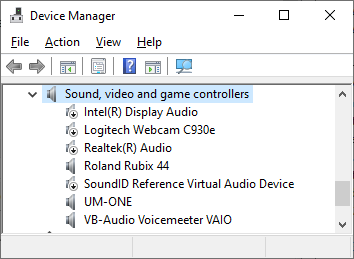
Disabling devices (not uninstalling them) takes seconds and removes entire classes of background activity. Open Device manager –> Sound, video and game controllers.
LatencyMon as a Learning Tool, Not a Stress Test
Used poorly, LatencyMon can make you paranoid. Used well, it teaches you how your system actually behaves. The key is not to panic over single spikes. Watch for patterns. Correlate spikes with actions. Change one thing at a time. Stop when the system behaves. And most importantly: don’t chase perfection. Chase stability.
Why This Matters for Musicians
We tend to blame ourselves when technology gets flaky.
“Maybe I pushed the buffer too low.”
“Maybe this plugin is unstable.”
“Maybe I need a new machine.”
Sometimes the problem isn’t musical or computational at all. It’s infrastructural. Understanding that — and knowing how to verify it — is deeply calming.
A Practical Takeaway
If you’ve ever stared at a frozen DAW wondering what just happened, learning to read LatencyMon — even a little — is worth your time.
It certainly was for me.
§